![[Good Net-Keeping Seal of Approval]](gnksa.gif)
Messenger Pro is a mail and news client for the RISC OS platform which is compatible with all popular RISC OS Internet suites, including the ANT Internet Suite, Voyager, R-Comp's Internet Suite, Termite Internet, Acornet and KA9Q. It is also compatible with the POPstar, NewsHound, FreeNews, FreeSMTP and POP fetchers.

Amongst its many features are the following:
Messenger uses an attractive graphical user interface, which complies with the guidelines set out for good RISC OS application design as documented in the Acorn RISC OS Style Guide.
Messenger has full support for MIME encoded messages, decomposing multipart messages into their constituent parts, and automatically decoding any which are encoded using base64 or the quoted-printable encoding. Messenger will then offer to display any textual parts, and present the remainder as attachments which may be saved out. Messenger can also be used to send MIME format messages, with proper labelling and encoding of their content.
Messenger interacts with the command line based PGP program to automatically recognise encrypted messages and decrypt them. It also allows encrypted messages to be originated from Messenger, as well as offering support for sending and verifying signed messages. A convenient keyring management system is also included, which allows all key management functions to be performed from within Messenger.

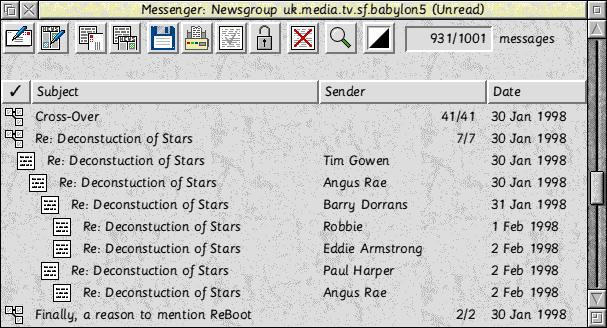
New to Messenger Pro V2.50 is the full graphical representation of threads. In addition to the existing indentation technique of showing replies to messages, v2.50 also draws in lines linking messages to their parents, making the relationships much easier to visualise. Navigation of threads is also enhanced by provision of a menu listing siblings of the current message and by the inclusion of a menu option which allows direct access to the current message's parent. Other improvements to the threading code also mean that threading is even more reliable than before.
Messenger Pro V2.50 has improved keyboard support for those users who prefer not to use the mouse when reading mail and news. The space bar can now be used for most reading tasks, advancing to the next unread message or next group as appropriate, automatically closing and opening windows where necessary. In addition, window scrolling and part selection in multipart messages can now be accomplished entirely from the keyboard.
Much enhanced in v2.50 is Messenger Pro's handling of URLs, e-mail addresses and message IDs highlighted in message windows. Clicking on a message ID now allows that message to be displayed, to be requested on the next download or to be retrieved from Deja.com. All URL launches may be deferred such that they're remembered until the next time the user goes online, thus allowing interesting sites referenced in mail or news to be looked at when next convenient.
Building on its already comprehensive set of configuration options for the display of groups, Messenger Pro V2.50 allows full control over which fields are displayed for each group, how wide each field is and where it appears in the display. All of this is configured easily using a fully drag and drop interface. Also, drag selections now auto scroll the window, allowing rapid selection of multiple messages.
The new message send window allows signatures to be selected at send time and altered during message composition by selection from a menu. It also now includes a request receipt option to allow confirmation messages to be generated by the recipient when the e-mail has been successfully delivered. Messages may now also be saved unfinished and completed during another session. Finally, interoperability with PC users has been improved by recognising PC file typed files and preserving DOS naming conventions.
A number of changes have been made to improve the quality of the search facilities. It is now possible to abort a long search rather than be forced to wait for it to complete, and to recall the last search made and edit it before resubmitting. It is also now much easier to specify multiple groups to search by simply selecting each one from a menu.
A new arrivals window has been added which lists all groups which have received new messages during the current session. If you have a large number of groups receiving new messages and have trouble recognising where your messages have gone to, then you will find this new facility invaluable.
Unlike some other newsreaders, Messenger uses the references headers of articles to perform threading, rather than just the subject. This has the advantage in keeping a thread together when the subject changes, and also allows easy access from a menu to any replies to a particular article, or any of the articles that preceded it. Messenger's threads display shows one item per thread, but allows the expansion of threads to list the messages they contain, suitably indented to indicate the thread structure. As messages are read, Messenger automatically opens the thread containing the current message, scrolls it into view, highlights it and closes the thread afterwards. Buttons to move between threads, optionally marking all the skipped articles as read, are also provided.
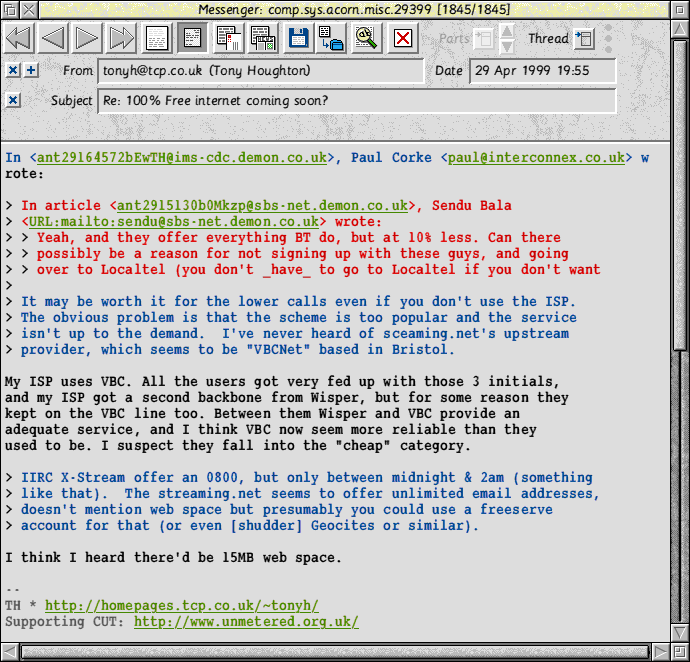
Messenger will colour headers, signatures, attributions and quoted text in different colours, to make it easier to distinguish between them. This is particularly beneficial with quoted text, as it allows the user to make out who said what, which is made even easier with attribution colouring, since the colour of the text can be matched to the colour of the attribution containing the name of the person who wrote it.
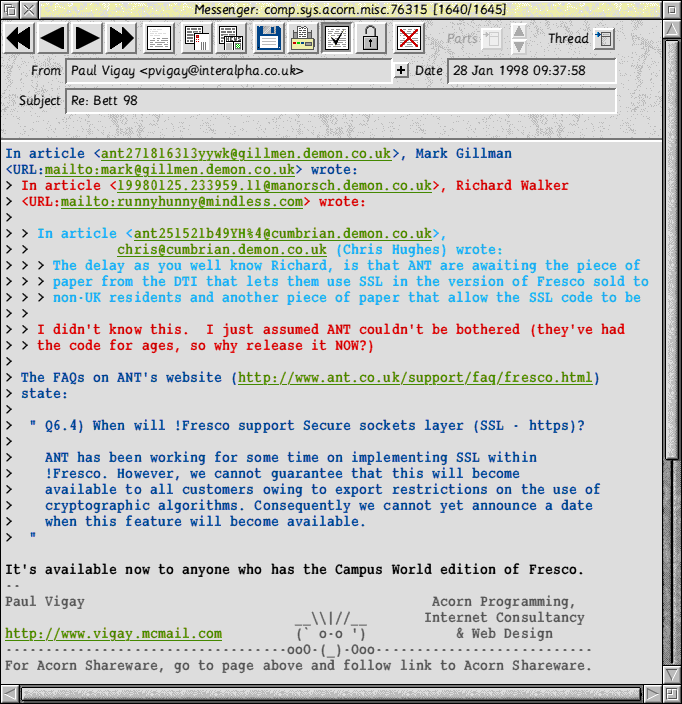
Messenger can recognise URLs and WWW/FTP sites in messages and highlight them, so that clicking on them launches them using your web browser, terminal emulator, FTP client, etc. E-mail addresses are also highlighted, and full support is provided for handling mailto: and news: URLs launched from other applications. Messenger supports both the ANT and Acorn URI launching protocols.
Messenger's group and folder displays support drag and drop of the messages they contain, so copying messages is a simple matter of dragging them from one window to the other. Moving messages is also possible by dragging with Shift held down, just like using the RISC OS Filer.
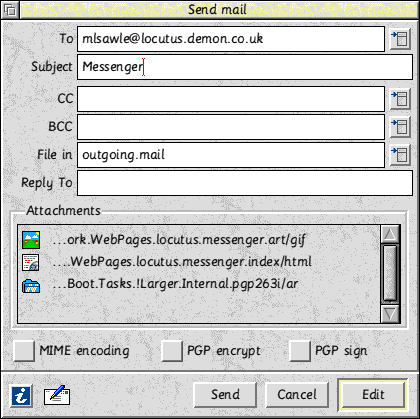
Newsbase has no limitations on the number of mailboxes you can have, and so neither does Messenger. This is useful if you have more than one account and want to keep mail from different accounts separate. Messenger allows you to configure whether a click on its icon will take you to your main mailbox, or to a window containing all your mailboxes, thus allowing easy access to all your mail.
Newsbase also allows the creation of more than one user, so everybody who uses mail and news on your machine can have a separate, optionally password protected, account. This not only means that private messages aren't read by anybody else, but also that each user can have his/her own configured settings.
Messenger contains an address book which allows you to store commonly used e-mail addresses, and thus allowing you to choose them from a menu when you want to send mail. Messenger also allows you to associate an alias with each address, which acts as a form of shorthand for that address and which Messenger will expand automatically. Groups of addresses may also be set up allowing you to send to multiple addresses with a single alias. Distribution lists are also supported, which allow the sending of mail to a list of addresses held in a separate file.
Messages in newsgroups which are configured for header only download in your news transport, are recognised as such and displayed accordingly. A fetch body option is then available, which will request that the full article is fetched on your next download.
Messenger's message display window can show messages using any RISC OS outline font, or any of the bitmap fonts used by Zap.
Messages may be saved or printed either as they are, or with any necessary decoding (PGP or MIME) performed first. Headers may optionally be included.
Messenger marks any messages to which you reply as being replied, and indicates these differently in folder and group displays. This flag may also be cleared or set manually.
Messenger integrates with NewsFind allowing Messenger to invoke a search, and automatically display the results when it has finished. NewsFind has flexible facilities for finding text in whole messages, or just a particular header. It also supports wildcards to enable searching across more than one group, or a wildcarded search string.
Newsbase can be configured to filter mail from mailing lists into a folder, and then Messenger can be told to treat that folder as a mailing list. This means that the list will appear in the newsreader window, and also that separate reply and followup options are provided that allow replies to be sent to the sender of a particular message, or to the list. In addition, posting a new message to the list is made easier since Messenger will recall the list submission address and specify this for you when sending your message.
Messages may be sorted simply by clicking on the desired column heading which allows sorting by subject, sender, date and by whether the message has been read or not. The sort setting has a memory, so that the current sort will sort matching messages according to the setting of the previous sort, thus allowing more than one sort key. Sort settings may also be saved on a per-group basis.
Messenger uses a dynamic area for memory storage, and automatically enables virtual memory when Clares' Virtualise is in use, thus removing any memory constraints.
Messenger Pro features a new offline database manager which offers a speed advantage over Newsbase in all areas, but particularly during debatch and expire operations.
In addition, much of the processing that takes place when viewing messages is now performed in memory rather than via disc, hence making overall usage appear much faster.
Messenger Pro is designed to be easier to configure than any existing mail and news software. The installation process will ask for a bare minimum of details and will then configure itself, obtaining information from your existing software. Those users who have been intimidated by Newsbase's user interface in the past will find Messenger Pro's own database considerably easier to use.
Much effort has also been made to retain Messenger's multi-user support whilst at the same time removing some of the complexity of multi-user configuration. Messenger Pro defaults to a single user installation where the user installing it is given full system administration privileges without having to create the user himself. The user is then automatically subscribed to all groups, removing the need to subscribe once for the news feed and again for himself, as was the case in previous versions.
Support is provided for reading mail and news online via a connection to a separate mail and news server, thus removing the requirement to store all mail and news locally. The standard IMAP mail and NNTP news protocols are used to do this.
Messenger Pro can be configured for offline or online use and maintains separate configurations for each, allowing easy switching between them.
For the first time, Messenger now supports the Voyager Internet Suite, the software used by the majority of Argonet users. This is by means of a dedicated Voyager transport which enables the two pieces of software to work together.
The freeware version of Messenger uses a third party application, NewsFind, to perform message searches. Messenger Pro removes this dependency and performs all searches itself, utilising direct access to the database to considerably speed up the process.
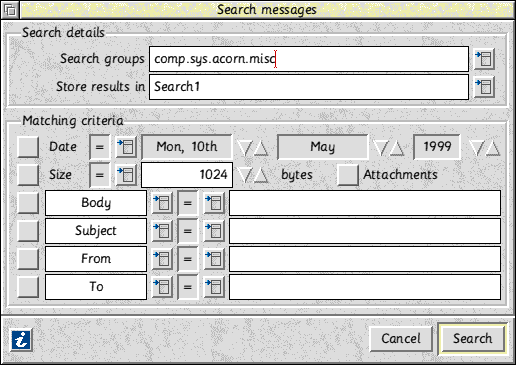
Messenger Pro also offers more flexible search criteria to be specified, searching on up to four headers or in the body, together with size and date specifications. Attachments may also be easily found.
In addition, local searches for text in displayed messages may also be performed.
Messenger Pro uses a more efficient technique of storing messages which considerably reduces the amount of disc space wasted, and hence the overall amount of space used. In addition, all messages are held in compressed form and only decompressed when needed.
Messenger already has comprehensive support for attachments, but Messenger Pro extends this to enable identification of those messages with attachments from the group viewer, removing the need to open each message first.
A strip attachments option has also been added which allows attachments to be deleted; useful if you want to archive your mail but don't want to keep lots of large files around.
When forwarding messages, attachments are now automatically copied across to the new message, removing the need to do this manually. Attachments are also now supported in news postings, although warnings are given for those groups where this would be deemed inappropriate.
Messenger Pro features full queue editing facilities; a task that was previously delegated to the third party QEdit application. This means that the outgoing mail and news queues can be treated just like another group, using the same user interface for displaying and manipulating queued messages. Messages are then edited using the existing editing facilities with which the user will already be familiar.
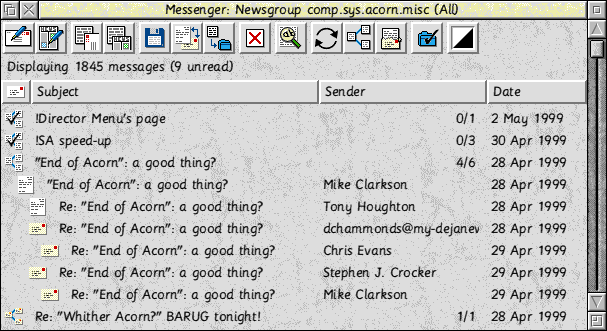
Messages may now be edited and saved back to the database, allowing you to make permanent changes to the headers or the body, e.g. to correct a mislabelled Subject header, or to annotate messages.
Messages may also be used as the basis of an outgoing edit session, which is useful for correcting misaddressed mail or for sending another copy of a message which didn't get through the first time.
Messenger Pro is one of a very small number of newsreaders on any platform to conform to the Good Net-Keeping Seal of Approval. This is a tough set of guidelines which requires that news posting software generate articles that properly adhere to Internet standards, and provide adequate protection for the user so that his postings don't annoy other users by exhibiting common mistakes made by beginners.
Messenger Pro also complies with the latest draft of the USEFOR working group, who are currently defining the new standard for the format of news messages.
Messenger now displays more header information in its message windows so you can easily see who else received a particular message, and where replies/follow ups will go to.
Deletions are now deferred, which means that messages are marked for deletion and only removed when the user closes or refreshes the current group window. This also allows the user to change his mind and undelete them before this happens.
Messenger Pro also has full support for a per-user waste basket, which automatically catches all deleted messages in the event that they may be required later or were deleted by accident. Messages are then automatically deleted from the waste basket after a configurable period of time.
Messenger's user interface has been redesigned with new sprites giving it a fresher and more professional appearance. The separate mailer, newsreader and folder windows of the original have been replaced with two windows which can display any type of group: one for the groups the user will use every day, and another for archiving or for groups that aren't accessed very often. These groups are now sorted to ensure that more focussed groups, and hence those that are more important, appear at the top of the display for easier access.

Extra buttons have also been added to make commonly used operations such as folder filing much easier.
Owing to bugs in Newsbase, Messenger's reply tracking often didn't work very well. Now, when used with the new database engine, a thread can be followed right back to the root message, by choosing earlier messages from a menu. Thus with two mouse clicks you can read the message that triggered the reply you're currently reading, and step back through the discussion one message or many messages at a time, regardless of where those messages are stored.
Important messages can now be marked as requiring attention, which will highlight them in group viewers and ensure that Messenger won't let you forget that they exist.
Messenger now allows you to assign a sample to a person that will be played when mail from that person is received, or you may instead have the names of people who send you mail read out as you receive them (if you have the speech software). Notification of new mail via the chime can also be enabled on a per-group basis.
In addition, Messenger's group list windows will now indicate which groups have had new arrivals since you last opened them.
Messenger now has more keyboard shortcuts and tries harder to keep the input focus when it closes its windows, thus making it much easier to control via the keyboard.
Messenger Pro employs better error recovery procedures, so in the event of a corrupt overview or configuration file, the file is automatically repaired or copied from a backup. All critical configuration files are backed up as a matter of course.
Messenger Pro is fully RISC OS 4 compatible.
Messenger Pro is being sold through R-Comp - all enquiries should be made through them.
Current pricing (including VAT) is as follows:
| Messenger Pro (offline only) | £37.00 |
| Messenger Pro (offline+online IMAP/NNTP) | £45.00 |
| Messenger Pro (site licence) | £100.00 |
| Messenger Pro (server version) | £100.00 |
Please see the R-Comp Messenger Pro web site for more information.
| © 2026 intellegit - info@intellegit.com |